Power-user offers remote training sessions to help the users of your organization discover and master Power-user for PowerPoint, Excel and Word: a 1-hour kick-off training on the main features, then a 1-hour session to build expertise. Sessions are held on Teams or your own video tool, are reserved for your organization, and their program can be adapted to your needs.
In short
- Dedicated sessions: a 1h kick-off training, then a 1h "build expertise" session, for your organization only
- Format: remote, on Teams or your own video tool
- Tailored: the program can be adapted to your needs
- Newcomers: free open sessions every 2 weeks
In this article
The learning journey
To make the most of Power-user, users need the right training at the right time. We suggest the journey below, which we can adapt to your organization: tell us your wishes.
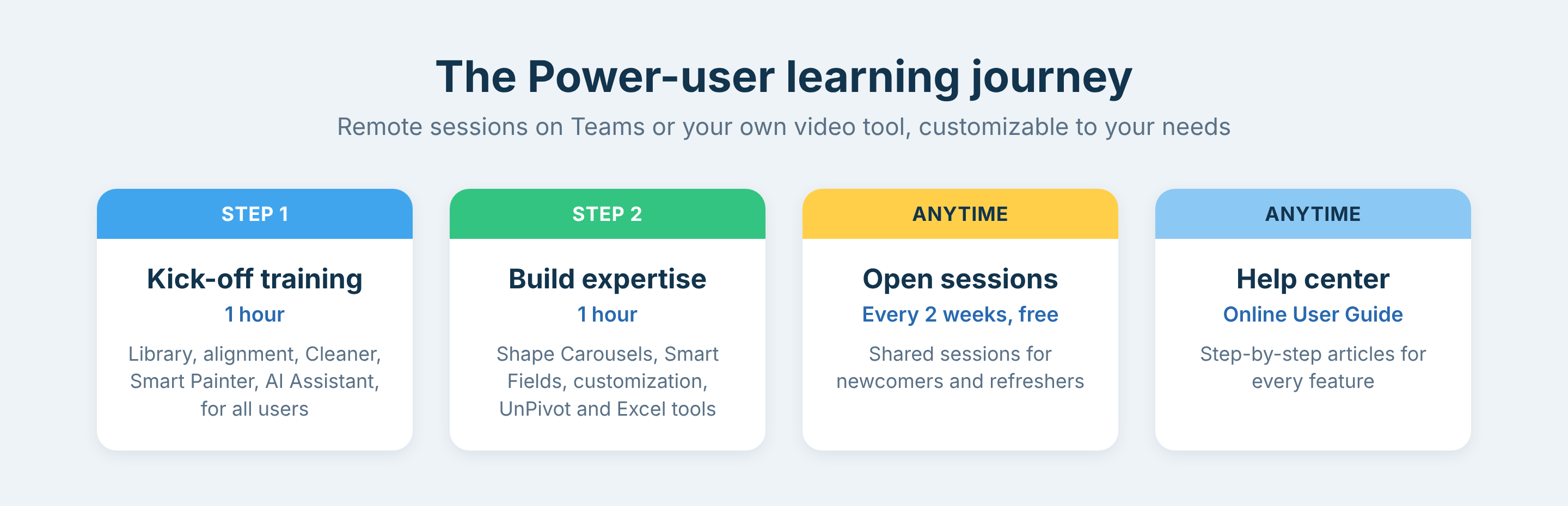
The Power-user learning journey: kick-off training, build expertise session, open sessions and help center
- Kick-off training (1h): all users discover the Library, the Alignment toolbar and the main advanced features of Power-user, such as the Cleaner, the Smart Painter and the AI Assistant.
- Build expertise session (1h): after a short refresher, users go further with Shape Carousels, Smart Fields, the customization of the Library and the Agenda, and the Excel tools such as UnPivot table.
- Then, anytime: newcomers join the free open sessions, and every user finds step-by-step articles in this help center.
Agenda of the kick-off training (1 hour)
| Time | Topic | App |
|---|---|---|
| 5 min | Introduction: overview of the benefits and key features of Power-user | |
| 15 min | The Library and its components: slides, icons, pictures and logos, maps, charts and shapes | PowerPoint |
| 5 min | The Alignment toolbar | PowerPoint |
| 20 min | Advanced features: the Cleaner, the Smart Painter, the Excel-PowerPoint link, the Agenda and the AI Assistant | PowerPoint, Excel |
| 5 min | Questions and answers |
Agenda of the build expertise session (1 hour)
| Time | Topic | App |
|---|---|---|
| 10 min | Refresher on the Library and the Alignment toolbar | PowerPoint |
| 30 min | Customizing the Library with your own assets | PowerPoint, Excel, Word |
| Shape Carousels | PowerPoint | |
| Smart Fields | PowerPoint | |
| Customizing the Agenda | PowerPoint | |
| Advanced uses of the Smart Painter and the Excel-PowerPoint link | PowerPoint, Excel | |
| The Tab Explorer | PowerPoint, Excel, Word | |
| 10 min | UnPivot table, advanced functions (CAGR, Weighted_Average, SumColor…), Merged cells manager and Paste exact formula | Excel |
| 10 min | Questions and answers |
Open sessions for newcomers
On top of the sessions dedicated to your organization, we run free open sessions every 2 weeks, shared by users from several organizations. They are a simple solution for users who join your organization after your dedicated sessions.
Frequently asked questions about Power-user training
Does Power-user offer training?
Yes. Power-user runs remote training sessions dedicated to your organization: a 1-hour kick-off training on the main features and a 1-hour session on the advanced features. Free open sessions are also held every 2 weeks.
How long is a Power-user training session?
Each dedicated Power-user session lasts 1 hour, including time for questions and answers.
Are Power-user training sessions held remotely?
Yes. Power-user training sessions are held on Teams or your own video tool, and the dedicated sessions are reserved for participants from your organization.
Can the training program be adapted to our needs?
Yes. Power-user can adapt the training program to your organization, for example to focus on PowerPoint, on Excel or on your own templates.
How can new users be trained after the kick-off?
New users can register for the free Power-user open sessions, held every 2 weeks, on the Power-user training sessions page.
Was this article helpful?
That’s Great!
Thank you for your feedback
Sorry! We couldn't be helpful
Thank you for your feedback
Feedback sent
We appreciate your effort and will try to fix the article