The Power-user UnPivot table is a feature of the Power-user add-in for Excel that turns a crosstab table into a database in one click: one column per field, one row per value. Your data can then be used in PivotTables, slicers, timelines and formulas such as XLOOKUP or SUMIFS, without hours of copying and pasting.
In short
- Where: UnPivot table in the Power-user tab of Excel
- What you get: a new sheet with your table flattened into a database
- Why: PivotTables and lookup formulas need data organized as a database, not as a report
In this article
How to UnPivot a table in Excel
- In Excel, on the Power-user tab, click UnPivot table.
- In the dialog box, select the whole table, including the row and column headers, and validate.
- Power-user creates a new sheet with the unpivoted data. Add the column headers, for example Country, Year and Value.

UnPivot table in Excel: a crosstab table turned into a database by Power-user
Why unpivot your data?
Many Excel issues come from the same habit: organizing data as a report instead of a database. Reports are needed in the end, but they make data much harder to analyze.
The problem with crosstab tables
In this example, the data is a crosstab table: one column per Year, and the values at the intersection of a Country (in rows) and a Year (in columns).
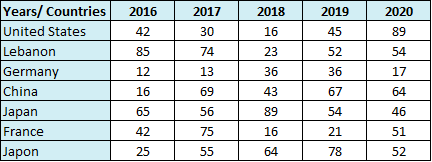
Data organized as a crosstab table: countries in rows, years in columns
In a PivotTable, each year then becomes a separate field. You cannot use Year as a filter, nor sum the values of all years: the PivotTable is of little use.

PivotTable fields of a crosstab table: one field per year
A database unlocks PivotTables and formulas
In a database, each column holds a single field. Here, the years go in one column and the values in another:

The same data organized as a database: Country, Year and Value columns
With this data source, PivotTables can summarize the data in any way, and you can add slicers and timelines to build dynamic reports and dashboards.

PivotTable with slicers built on data organized as a database
A database is also easier to query with formulas such as XLOOKUP, INDEX/MATCH, SUMIFS or COUNTIFS.
What unpivoting means
To unpivot (or flatten) a table is to turn a crosstab table into a database. Done by hand, it takes countless copy-pastes and duplications to fill each column with the right field. The Power-user UnPivot table does it in one click.
Frequently asked questions about unpivoting tables in Excel
What does unpivot mean in Excel?
To unpivot a table means turning a crosstab table, for example countries in rows and years in columns, into a database with one column per field: Country, Year and Value. The Power-user UnPivot table does it in one click.
How do I unpivot a table in Excel?
With the Power-user add-in, click UnPivot table in the Power-user tab of Excel, select the whole table with its headers and validate. Power-user creates a new sheet with the unpivoted data.
How do I convert a crosstab table into a list in Excel?
Use the Power-user UnPivot table: it flattens a crosstab table into a list with one row per value, in a new sheet. Then add the column headers.
Why can I not use a PivotTable on my data?
If your data is a crosstab table with one column per year or per month, each column becomes a separate PivotTable field. Unpivot the table first, for example with the Power-user UnPivot table, so that the years are in a single column.
Does UnPivot table change my original data?
No. The Power-user UnPivot table creates a new sheet with the unpivoted data and leaves the original table as it is.
Was this article helpful?
That’s Great!
Thank you for your feedback
Sorry! We couldn't be helpful
Thank you for your feedback
Feedback sent
We appreciate your effort and will try to fix the article