Power-user is a Microsoft Office add-in that runs locally on each user's computer: your documents never leave your environment and Power-user never has access to them. Power-user collects only the minimal data needed for license management, support and billing, hosts client data with OVHcloud in France, and lets admins turn off every third-party and AI service.
Security at a glance
- Runs locally: your documents never leave your environment and are never accessible to Power-user
- Minimal data: only for license management, support and billing; no sensitive data, no passwords, no document content
- Hosting: client data hosted by OVHcloud in France, personal data processed under a GDPR Data Processing Agreement
- Optional third parties: all third-party services, including AI features, can be turned off centrally by your admins
- Certification: Power-user is working towards ISO/IEC 27001 certification
In this article
How Power-user runs in your environment
Power-user is a Microsoft Office add-in installed on each user's Windows computer. It runs locally, inside PowerPoint, Excel and Word, and users do not need to sign in once the license is activated.
Once activated, Power-user keeps working offline. Without a connection, users do not receive software updates, their license status is not reported to your license admins, and shared libraries set up by admins are not refreshed. Users can also keep working if the Power-user licensing service is temporarily unavailable.
The Power-user installer and add-in are digitally signed by Power-user SAS. IT teams can deploy Power-user with Microsoft Intune or by script.
What data Power-user collects
The diagram below shows the data exchanges between users' computers, the Power-user service, the admin portal and third-party services.
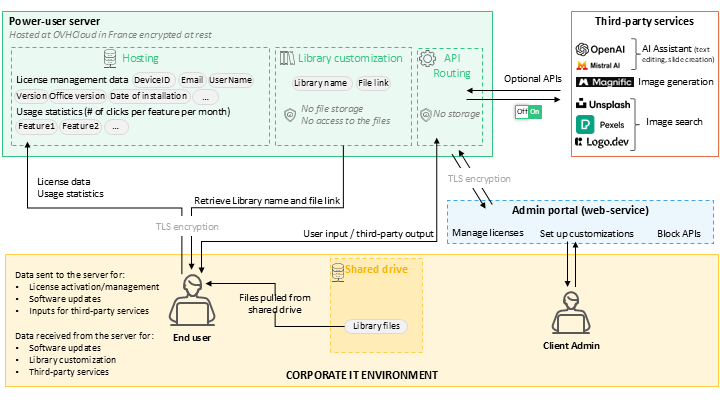
Data exchanges between users' computers, the Power-user service, the admin portal and third-party services
Data Power-user does not collect
The best way to protect data is not to share data that is not essential. Power-user was designed to collect only minimal data:
- Power-user does not collect user passwords.
- Power-user does not collect the documents or content users work on.
- Power-user does not collect sensitive data, such as racial or ethnic origin, sexual orientation, health, political opinions, or religious or philosophical beliefs.
Files in your Library stay in your environment
Admins can add corporate resources to the Power-user Library, such as PowerPoint presentations or Excel workbooks. By default, Power-user does not need access to these files: it only knows their name and link. Each computer downloads the files directly from the location where you store them.

Shared Library files downloaded by each computer directly from your own storage
Data Power-user collects and why
| Data collected | Details |
|---|---|
| User data | Windows user name, email address, organization name and domain, job title, user settings |
| Technical data | License key, software version and license type for Power-user and Microsoft 365, installation and validity dates, logs |
| Usage data | How the application is used |
| Purpose | What the data is used for |
|---|---|
| License management | Managing license validity; giving, controlling and revoking access; transferring licenses to new devices; letting admins do the same from their admin portal |
| Support | Answering user emails and tickets, informing users about key events related to their license, and sending them the right documentation |
| Billing | Measuring license consumption and validity, and meeting regulatory obligations |
Third-party services and AI features (optional)
Partner services
Apart from the services below, Power-user does not send any user data to third parties. These partners provide optional features directly in Power-user:
| Partner | What it receives |
|---|---|
| Pexels | Keywords |
| Unsplash | Keywords |
| Logo.dev | Keywords |
| Magnific | Image description |
| OpenAI | Text or slides |
| Mistral AI | Text or slides |
Each request follows the same process:
- The user enters an input (keywords, a prompt, a text or slides).
- Power-user's servers receive the request and call the partner's API.
- The partner sends back one or more files, downloaded to the user's computer and displayed in the Library.
Because requests go through Power-user's servers, partners receive only the keywords or prompt entered by the user, not the user's identity, organization, history or documents. Users do not need their own account with these partners. Power-user does not store or keep the prompts, text or content sent to these services.
AI features
| AI feature | What the user does | Provider |
|---|---|---|
| Generating images | Writes a prompt to generate an image | Magnific |
| Editing text (rewording, correcting, translating…) | Shares a text and chooses the action; the AI returns the transformed text | OpenAI or Mistral AI, chosen by the organization in its admin portal |
| Creating or suggesting slides | Selects slides and asks the AI to suggest, and possibly apply, a layout | OpenAI or Mistral AI, chosen by the organization in its admin portal |
How AI providers handle data
| Magnific | OpenAI | Mistral AI | |
|---|---|---|---|
| Model | Not specified | GPT-5.4-mini | ministral-8b-2512 mistral-small-2603 mistral-ocr-2512 |
| Training on your data | No training on inputs or outputs | No training on data sent through the API (unlike chat.openai.com) | No training on data sent through the API |
| Data retention | Inputs and outputs treated as confidential | Zero Data Retention: data is deleted right after processing | Zero Data Retention: data is deleted right after processing |
| Security | ISO/IEC 27001 and SOC 2 Type 1 certified | Encrypted in transit (TLS) and at rest, strictly controlled access; no resale or commercial reuse | Encrypted in transit (TLS) |
| GDPR | GDPR compliant | GDPR compliant | GDPR compliant |
| Ownership and terms | The user owns all rights to inputs, and to outputs that comply with the terms of use | The user must respect OpenAI's terms of use | Power-user complements this with its own DPA and transparency on data flows |
| Reference | Magnific privacy policy | OpenAI data guide | Mistral AI trust center |
Contractual protection and other assurances
- All data we collect and use is protected by our Data Privacy Policy and License agreement.
- Power-user is listed on Microsoft Azure Marketplace, after a Microsoft process including reviews, scans and tests by Microsoft teams.
- We can share references from clients in industries with very high security standards, such as defense and payments or banking.
- We can give IT teams a test version of Power-user to test and analyze before deployment.
Security measures and procedures
Our Information Security Program protects all information, including client data, intellectual property and internal systems. It follows industry best practices, complies with relevant laws, and covers the security of our software development processes.
Risk assessments
- A risk assessment is performed at least once a year to identify threats, vulnerabilities and areas of improvement.
- All assets, tools and applications used at Power-user are mapped and classified by purpose, sensitivity and risk.
Encryption
- Client data is hosted by OVHcloud in France. Data in transit is encrypted with TLS 1.3 or 1.2, and data at rest is also encrypted. OVHcloud is certified ISO/IEC 27001, HDS and SOC 2, among others (see the OVHcloud website).
- Emails and tickets are encrypted at rest with AES 256-bit encryption, and in transit with HTTPS and TLS 1.2.
- All company laptops are encrypted with BitLocker.
Backup and business continuity
- Client data is backed up by OVHcloud on separate servers, and encrypted.
- Internal documents and emails are backed up through Microsoft 365, and source code is hosted and backed up on GitHub. Internal documents are also copied once a year to a secure offline drive.
- A Business Continuity Plan, reviewed at least once a year, sets a 24-hour recovery objective for client data and requires at least one backup restoration test per year.
- Because Power-user runs locally, users can keep working during an outage of our backend services.
Access control
- Access to our offices is restricted to authorized staff, monitored and logged, with 24/7 video surveillance.
- Role-based access control (RBAC) gives employees access only to the systems they need for their role.
- All devices are password-protected.
- Multi-factor authentication is mandatory.
Incident response
- Power-user has not faced any major incident in the past 10 years.
- An Incident Response Plan covers detection, containment, recovery, communication and post-incident review. It is reviewed every year and after any major incident.
- In case of a personal data breach affecting client data, Power-user notifies the client without undue delay, with the information needed to meet its own regulatory obligations. Where required, Power-user also notifies the French supervisory authority (CNIL) within 72 hours.
Security awareness training
- All new hires receive a security orientation as part of their onboarding.
- Regular security awareness trainings or communications help identify threats, vulnerabilities and areas of improvement.
Network security
- Power-user works cloud-first, with no on-premise corporate network or file server, which limits the risk of lateral spread.
- Software and hardware updates and patches are installed regularly to protect against known vulnerabilities.
- Internal devices are managed with Microsoft Intune and protected by Microsoft Defender for Endpoint, which provides next-generation antivirus and EDR/XDR capabilities for continuous protection and monitoring.
Application security and vulnerability management
- Security is built into our development lifecycle: secure coding practices, systematic code reviews, automated static code analysis (SAST) with Sonar, dependency management, and source code repositories protected with access controls and multi-factor authentication.
- Credentials are never stored in source code repositories.
- We track security advisories and CVEs affecting our components, update third-party libraries and apply security patches promptly.
- A third-party security specialist periodically runs external vulnerability scans of our public services, and internal devices are continuously monitored with Microsoft Defender.
- Power-user has been assessed through penetration tests commissioned by enterprise clients as part of their vendor assessments. Independent penetration testing will be set up as part of our ISO 27001 program.
Continuous improvement
Power-user is working towards ISO/IEC 27001 certification. Our information security management system already includes an Information Security Policy, an annual risk assessment and risk register, a Data Classification Policy, an Incident Response Plan, a Business Continuity Plan, and an IT acceptable use charter for all staff.
We improve continuously with feedback from audits and employees, and we follow emerging threats and security technologies to keep the program effective.
Frequently asked questions about Power-user data protection and security
Does Power-user have access to my documents?
No. Power-user runs locally inside PowerPoint, Excel and Word, and does not collect the documents or content users work on. Files added to a shared Library are downloaded by each computer directly from your own storage; Power-user only knows their name and link.
What data does Power-user collect?
Power-user collects user data (Windows user name, email address, organization, job title, settings), technical data (license key, versions, installation and validity dates, logs) and usage data. It is used only for license management, support and billing.
Where is Power-user data hosted?
Power-user client data is hosted by OVHcloud in France, encrypted in transit with TLS 1.3 or 1.2 and encrypted at rest. Personal data is processed under a GDPR Data Processing Agreement.
Is Power-user GDPR compliant?
Yes. Power-user processes personal data under a GDPR Data Processing Agreement, collects only minimal data, hosts client data in France, and notifies clients and, where required, the CNIL in case of a personal data breach.
Are the Power-user AI features safe for confidential data?
The Power-user AI features are optional. Requests go through Power-user's servers, so AI providers (OpenAI, Mistral AI, Magnific) receive only the user's input, not their identity or documents, and do not train their models on it. Admins can choose the provider or turn AI features off.
Can we turn off third-party services and AI in Power-user?
Yes. Admins can turn off AI features or choose the AI provider from the Power-user admin portal, and can hide specific features or block all third-party services with registry keys during deployment.
Is Power-user ISO 27001 certified?
Power-user is working towards ISO/IEC 27001 certification. Its information security management system already includes an Information Security Policy, an annual risk assessment, an Incident Response Plan and a Business Continuity Plan.
Was this article helpful?
That’s Great!
Thank you for your feedback
Sorry! We couldn't be helpful
Thank you for your feedback
Feedback sent
We appreciate your effort and will try to fix the article