Power-user is a productivity add-in for PowerPoint, Excel and Word that adds dozens of features to create, format and align slides, documents and spreadsheets faster. It helps you deliver high-quality presentations, communicate clearly with internal and external stakeholders, and work up to 50% faster in Microsoft Office.
In short
- Where: a Power-user tab in the ribbon of PowerPoint, Excel and Word
- Create: thousands of slides, icons, pictures, maps and advanced charts in the Library
- Format: fix fonts and colors, copy formats, build agendas and align shapes in one click
- Excel: link Excel data to PowerPoint, build Mekko and Sankey charts, use advanced functions
- Try it: install Power-user in about one minute
In this article
Where to find Power-user in PowerPoint
Once installed, Power-user adds a Power-user tab to the ribbon of PowerPoint, Excel and Word. All its features are there. To find one quickly, open the Command Center, the first button of the tab, and type its name.

The Power-user tab in the PowerPoint ribbon
Create presentations faster with the Library
The Power-user Library gives you ready-to-use content directly in PowerPoint, so you do not start from a blank slide.
Slides
Thousands of slide templates (agendas, timelines, processes, org charts…) to insert in one click. Your company can also add its own slides. See Library - Slides.

Examples of slide templates available in the Power-user Library
Icons, pictures, maps and shapes
Thousands of icons in several styles, pictures and logos, editable maps and shapes and diagrams, all searchable from the same window.

Examples of the icon themes provided by Power-user
Advanced charts
Charts that PowerPoint and Excel do not offer natively, such as waterfall, stacked waterfall, Sankey, Mekko, variable width columns or Gantt charts. See Library - Charts.
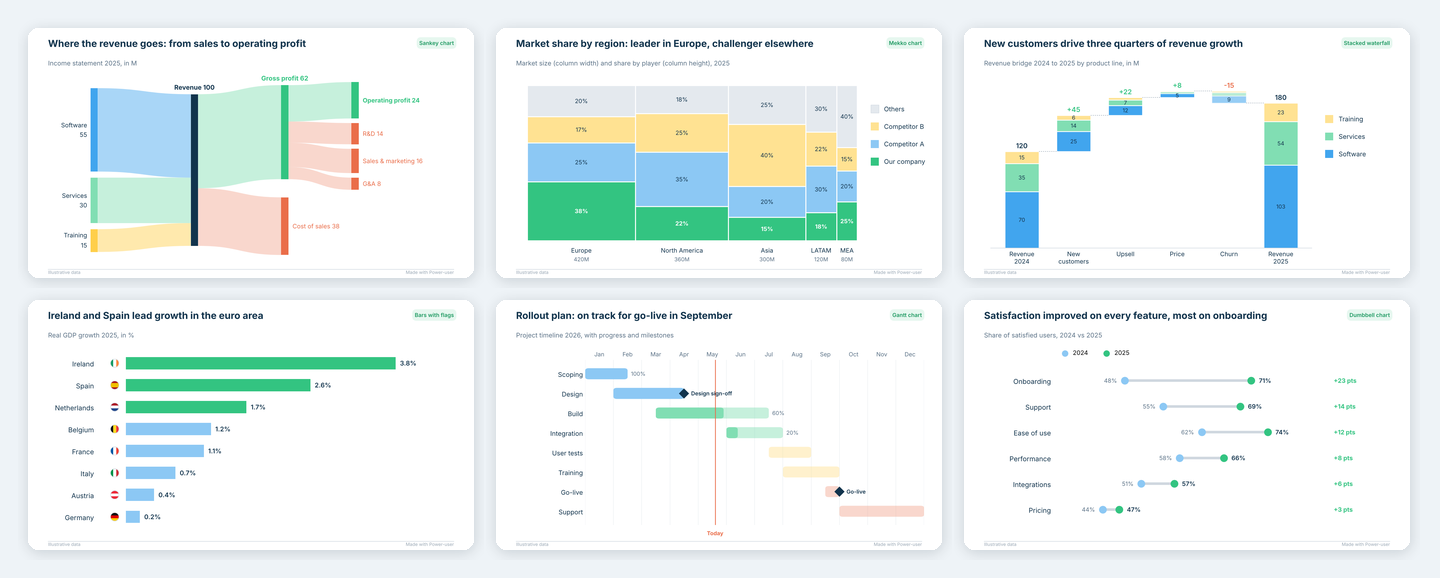
Examples of advanced charts from the Power-user Library
Stop wasting time on formatting
Clean up a presentation with the Cleaner
The Cleaner finds and fixes what breaks the consistency of a deck: fonts and colors outside your theme, and more. It also replaces colors across the whole presentation.

The Cleaner pane listing the issues found in a presentation
Copy formats with the Smart Painter
The Smart Painter copies the format of a reference shape, chart or table and applies it to others, in bulk, for example to make all slide titles consistent.
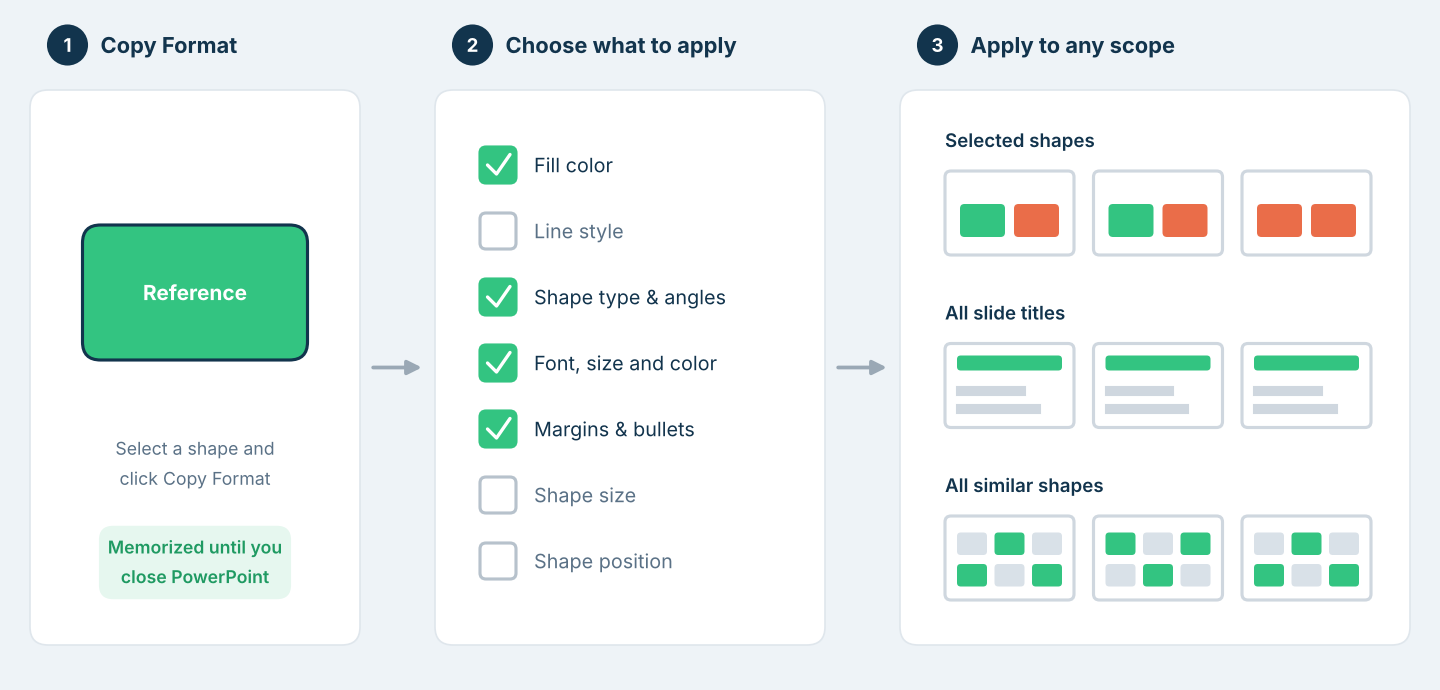
How the Smart Painter copies the format of a reference shape to other shapes
Create and update agenda slides automatically
The Agenda builds your agenda slides from the structure of your presentation and keeps them up to date when you add or move sections.
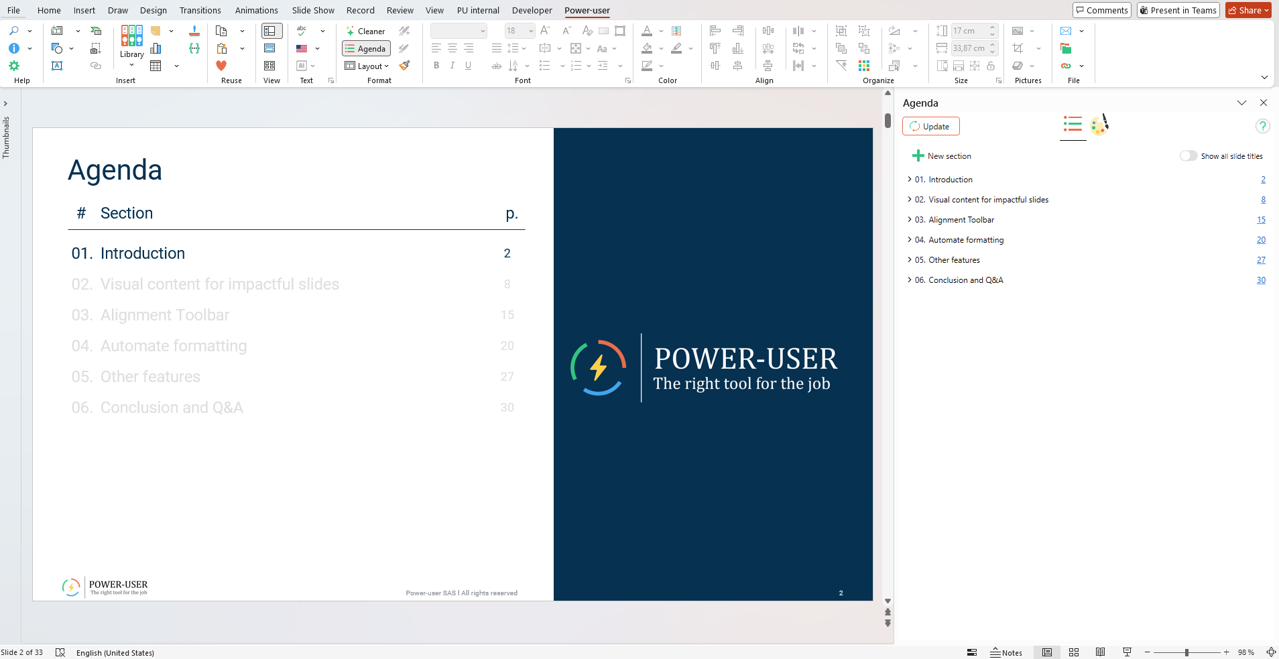
Power-user Agenda task pane open on the right side of PowerPoint
More formatting tools
- Language: set the proofing language of a whole presentation.
- Chart+: format all the charts of a slide range at once.
- Color Bar: apply your theme colors, with tints and shades, in one click.
Align and arrange shapes in one click
The Alignment toolbar positions shapes symmetrically, gives them the same height or width, swaps them, stacks them and more, each in one click.
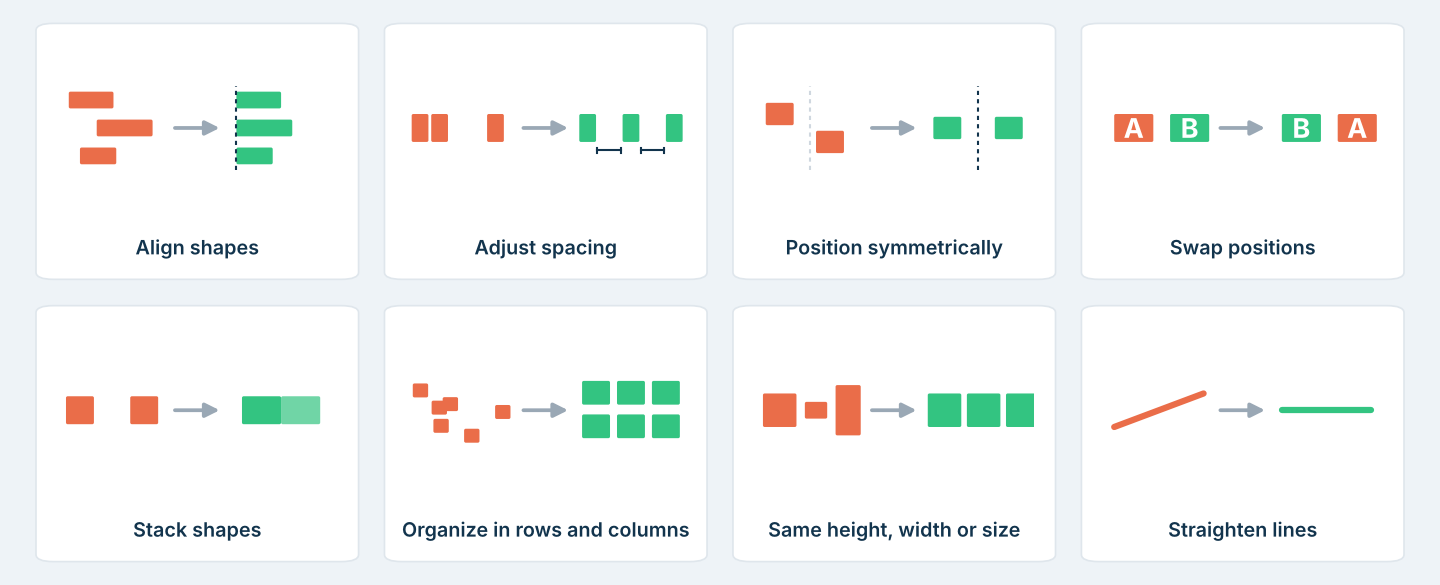
The main tools of the Power-user Alignment toolbar
Work faster in Excel
- Excel-PowerPoint link: link Excel data to your PowerPoint charts, tables and text, and update them when the data changes.
- Advanced charts: build Mekko, Sankey, Waterfall and other advanced charts.
- Advanced functions: use functions such as SUM_COLOR, CAGR or WEIGHTED_AVERAGE, and clean your spreadsheets and formulas.
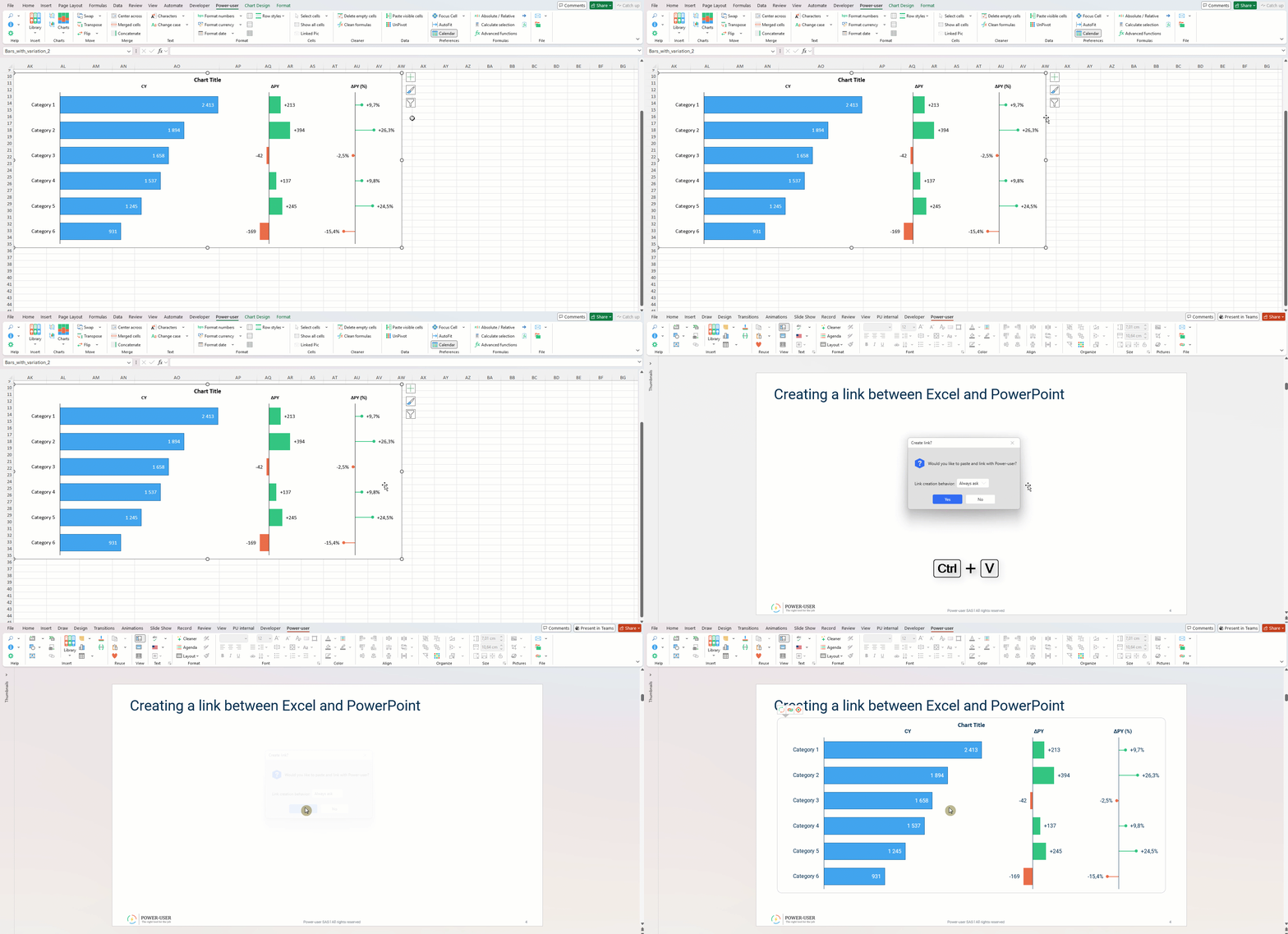
Copying a chart from Excel and pasting it into PowerPoint as a linked chart
Write better with the AI Assistant
Right-click a shape that contains text to use the AI Assistant: rephrase, fix spelling and grammar, shorten, expand, change the tone or translate your text, directly in PowerPoint.

The Power-user AI Assistant in the right-click menu of PowerPoint
More time savers
- Command Center: find any command and assign your own keyboard shortcuts.
- Tab Explorer: switch between open files with tabs and save them all at once.
- Gantt charts: build project timelines in PowerPoint.
- Stamps and Sticky notes: mark slides as draft or confidential, and leave review notes.
Frequently asked questions about Power-user
What is Power-user?
Power-user is a productivity add-in for PowerPoint, Excel and Word. It adds a Power-user tab with dozens of features: a Library of slides, icons, maps and advanced charts, formatting tools such as the Cleaner and the Smart Painter, an Alignment toolbar, an Excel-PowerPoint link and an AI Assistant.
Does Power-user work in Excel and Word?
Yes. Power-user adds its own tab to PowerPoint, Excel and Word. Most features are for PowerPoint; in Excel it adds the Excel-PowerPoint link, Mekko and Sankey charts and advanced functions such as CAGR or SUM_COLOR.
What can Power-user do that PowerPoint cannot?
Power-user adds features PowerPoint does not have natively: thousands of ready-to-use slides and icons, charts such as Sankey, Mekko or stacked waterfall, automatic agenda slides, bulk formatting with the Cleaner and the Smart Painter, and one-click alignment tools.
How do I try Power-user?
Download the Power-user.exe setup, run it, then open PowerPoint, Excel or Word and activate Power-user with your email address. Without a license key, you use Power-user as a trial.
Does Power-user work on Mac?
Power-user is installed with a Windows setup (Power-user.exe). See the Power-user software compatibility requirements for the supported versions of Windows and Microsoft Office.
Can my company add its own templates to Power-user?
Yes. With a Premium license, Power-user gives access to the customizations set up by your organization, such as corporate slides, icons, pictures, maps or tombstones.
Was this article helpful?
That’s Great!
Thank you for your feedback
Sorry! We couldn't be helpful
Thank you for your feedback
Feedback sent
We appreciate your effort and will try to fix the article